A practical look at prioritisation, delegation, and using AI to tackle the tasks that never make it to the top of your list.
The Task That Lived at the Bottom of the List
For the better part of a year, “refresh the website” sat on our backlog.
It wasn’t broken. It functioned fine. But it didn’t reflect where we were heading — particularly our focus on pragmatic AI adoption and business-first software development.
Every planning session, it would come up. Every time, it would get bumped.
Not because it wasn’t important. Because it never felt urgent enough.
If you’ve run a business, you know exactly what I’m talking about.
The Eisenhower Matrix Trap
There’s a classic prioritisation framework called the Eisenhower Matrix
The matrix splits tasks into four quadrants:
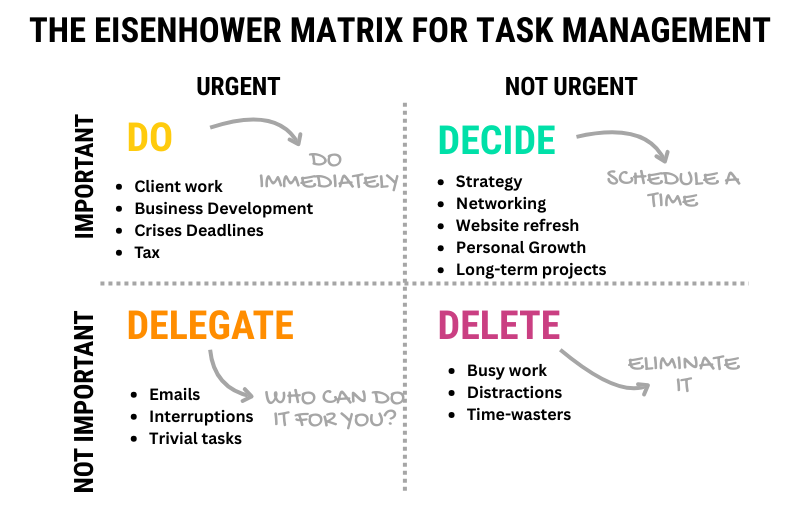
Our website refresh? Solidly in Quadrant 2: Important but Not Urgent.
Which meant it kept getting rescheduled. Because Quadrant 1 (urgent client work, delivery deadlines) was always full.
And that’s the trap.
Quadrant 2 tasks are where long-term value lives. But because they lack immediate pressure, they’re easy to defer indefinitely.
The Forcing Function: A New Content Strategy
As we kicked off 2026, we committed to producing meaningful, useful content for SMB owners navigating software decisions.
That meant the website couldn’t stay as it was. It needed to support this new direction — better structure, clearer messaging, a proper blog/insights section.
Suddenly, the urgency shifted. Not from external pressure, but from internal alignment.
The task moved from “we should do this eventually” to “this is blocking progress on something that matters.”
But we were still too busy to do it internally.
The Delegation Decision
With urgency now real but capacity still constrained, we had two options:
Option A: Hire a Design Agency
- Pros: Professional design, full rebrand, polished result
- Cons: $5K–$15K budget, 4–8 weeks timeline, requires significant input/feedback cycles, risk of over-design (we didn’t want a full rebrand - yet)
Option B: AI-Assisted Refresh
- Pros: Fast turnaround, lower cost, we keep creative control, demonstrates our own approach to pragmatic AI use
- Cons: Requires clear direction upfront, risk of generic output if not guided properly, still requires our time to review/refine
We chose Option B — but with a specific approach.
Our AI-Assisted Refresh Approach
Here’s how we tackled it:
1. Define the Constraints
We didn’t ask AI to “redesign our website.” We gave it clear constraints:
- Refresh copy to emphasise pragmatic AI, business-first software, Australian delivery
- Clean, minimal design — no bells and whistles
- Must work responsively (mobile-first)
Lesson: AI needs guardrails. “Make it better” produces generic output. Specific constraints produce useful output.
2. Iterate on Copy, Not Design
We focused on messaging first:
- Rewrote the homepage hero to be clearer about who we help and why
- Refined service descriptions to match how clients actually describe their problems
- Added a clear call-to-action (book a discovery call, not “contact us”)
- Fed it our brand voice and website copy produced by human copywriters over a year ago — good work we’d never got around to using
Then we handed the copy to AI and asked it to suggest layout improvements that supported the messaging hierarchy.
Lesson: Content strategy comes before design. If the message is unclear, no amount of design will fix it. Keep humans in the loop.
3. Keep Creative Control
AI suggested layouts, colour adjustments, typography changes. We reviewed each, kept what worked, rejected what didn’t.
We didn’t accept everything. We pushed back on:
- Over-designed hero sections (too much visual noise)
- Generic stock imagery suggestions (we iterated until the visuals felt right)
- Overly corporate tone in some copy suggestions (we rewrote it)
Lesson: AI is a tool, not a decision-maker. You still need taste and judgment.
4. Test and Refine
We reviewed the site on mobile, checked load times, tested navigation, fixed spacing issues.
This wasn’t a “set and forget” exercise. It was iterative — but faster than traditional design.
Total time invested: somewhere between 2 and 3 hours across a few sessions.
Result: A refreshed site that supports our content strategy, reflects our current positioning, and demonstrates our approach to AI — all without the budget or 8-week timeline of a full agency engagement.
What We Learned
1. “Important but Not Urgent” Tasks Need Forcing Functions
Without external urgency, these tasks will always lose to client work. You need to create the urgency yourself — by tying the task to something else that matters (for us, content strategy).
2. AI Works Best with Constraints
“Do this task for me” produces mediocre output. “Do this task within these constraints, and I’ll refine from there” produces useful output.
3. Delegation Doesn’t Mean Abdication
Whether you delegate to a person or a tool, you still need to:
- Define the outcome clearly
- Provide context and constraints
- Review and refine the output
- Make final decisions
The difference is speed and cost.
4. Pragmatic AI Use Means Knowing What to Keep In-House
We didn’t hand over strategy. We didn’t hand over brand decisions. We didn’t hand over content.
We used AI for layout suggestions, design refinements, and structure — the execution layer, not the strategy layer.
The Bigger Question: What’s on Your “Important but Not Urgent” List?
If you’re running a business, you probably have a few tasks like this:
- Update the website (that’s us)
- Document internal processes (so they’re not just in someone’s head)
- Automate the manual workflow that “only takes 10 minutes” (but happens 50 times a week)
- Build the internal tool that would save hours (but never feels urgent enough)
These tasks don’t scream for attention. But they compound.
And now, with AI as a delegation option, the calculus has changed.
Not for everything. But for more things than you might think.
When AI-Assisted Delegation Makes Sense
Consider AI-assisted delegation when:
- ✓ The task is well-defined (clear inputs and outputs)
- ✓ You can provide constraints (scope, style, structure)
- ✓ You have judgment to refine the output (not looking for “done for you”)
- ✓ Speed and cost matter more than perfection
- ✓ The task is blocking something more important
Don’t use AI when:
- ✗ Strategy or brand decisions are involved
- ✗ The task requires deep domain expertise
- ✗ You can’t articulate what “good” looks like
- ✗ The output directly faces clients (without review)
The Bottom Line
Our website refresh wasn’t about adopting AI for the sake of it.
It was about unblocking progress on something that mattered — without sacrificing client work to do it.
AI didn’t make the decisions. We did. But it made execution faster.
And that’s the whole point of pragmatic AI adoption: use it where it creates leverage, keep control where judgment matters, and free up energy for higher-value work.
If you have tasks stuck in the “Important but Not Urgent” quadrant, ask yourself:
Is this task waiting for time I’ll never have, or is it waiting for a different approach?